Resume Wizard
2024 — A web app that ranks a pile of resumes by the skills a job needs
01 Problem
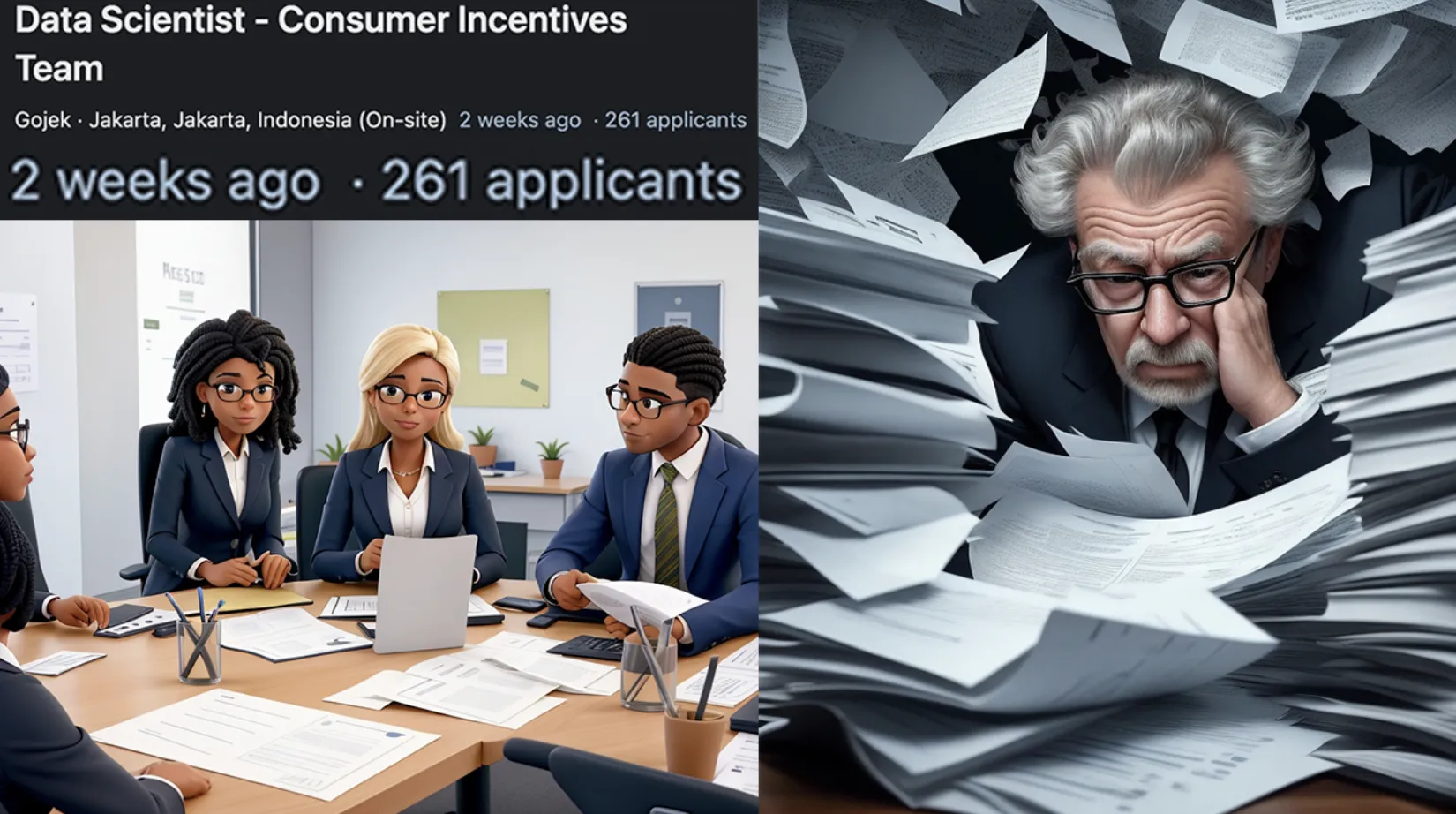
In July 2023 I was scrolling LinkedIn to see what companies wanted from a data scientist, and I stopped at one opening with 261 applicants after only two weeks. That was one opening at one company, and someone on its HR team had to go through all of them to find the few worth a test and an interview.
Resumes read in the order they arrive follow no order that means anything. The best one can sit at the bottom of the pile, after hours spent on ones that never fit, and the same resume can be judged differently by two people, or by one tired person at the end of the day.
02 Solution
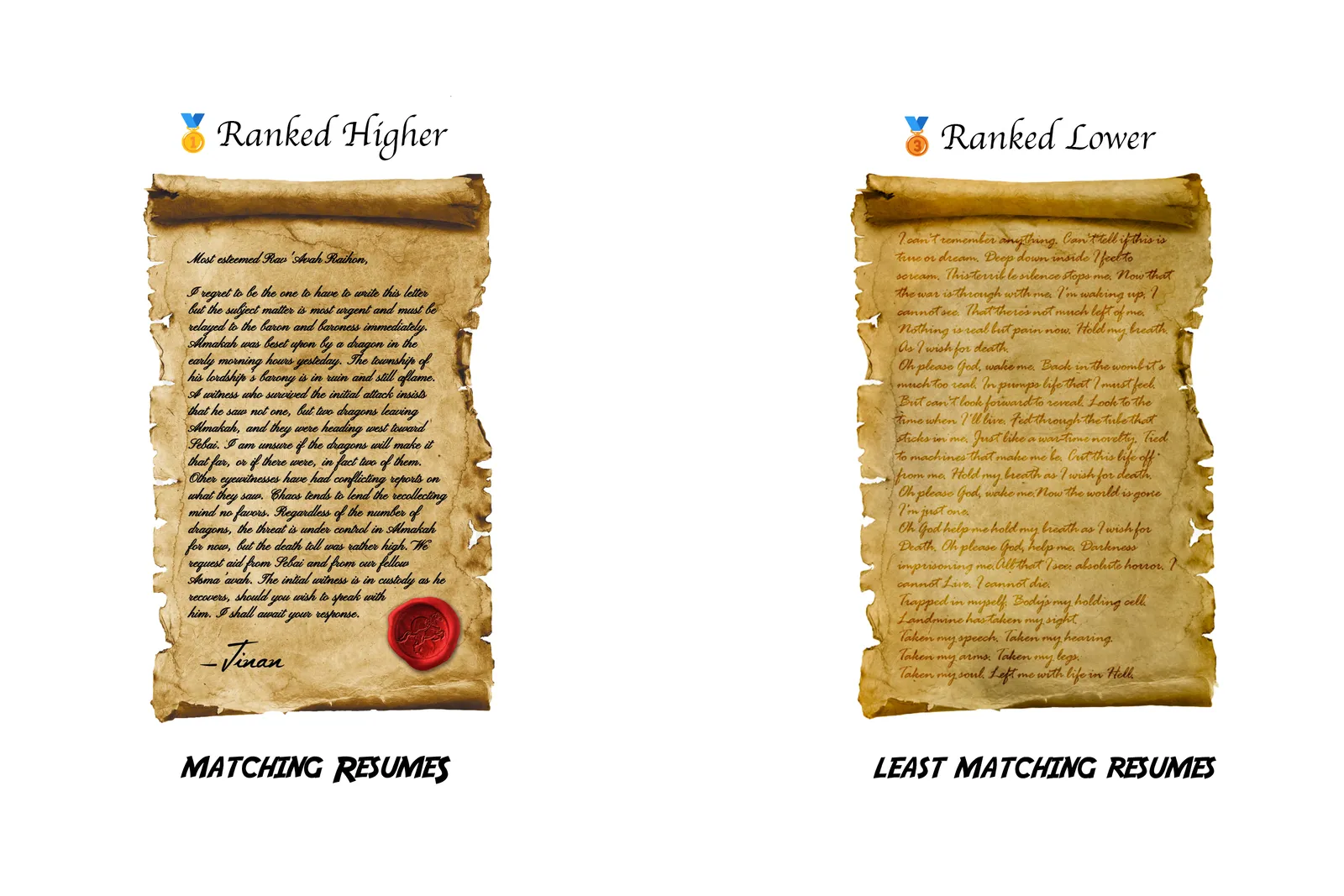
Resume Wizard puts the pile in order. A recruiter gives it the resumes and the skills the role needs, and it ranks every resume by how many of those skills it names, so the reading starts with the people most likely to fit.
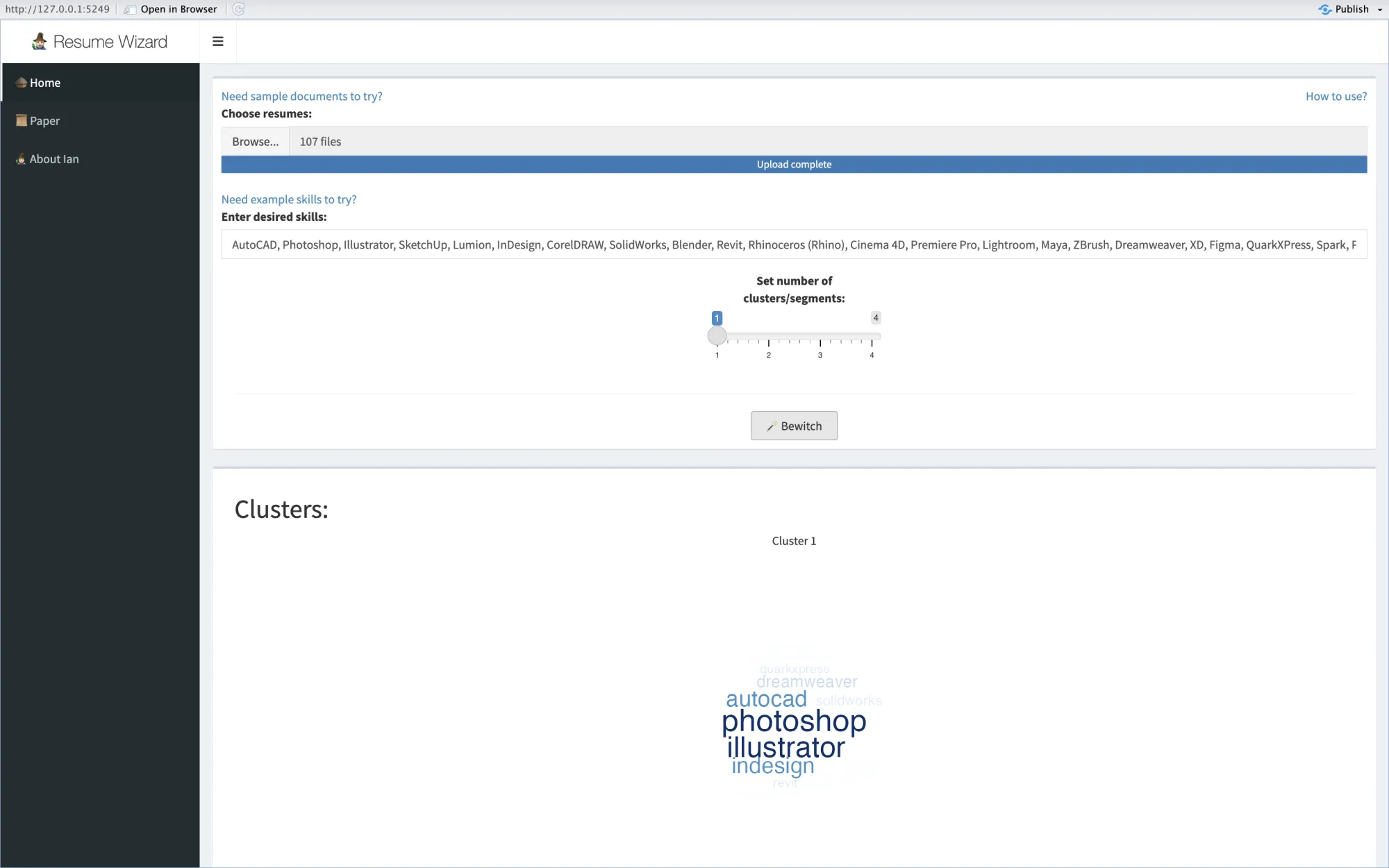
It was a web app. The recruiter uploads the resumes as PDFs, types the skills, either names of tools separated by commas or a written description with one skill per line, and presses Bewitch. Back comes a chart of the 15 best resumes and a table of all of them, each with the skills it matched and its share of the list. Any one resume opens in a viewer, and a slider splits the resumes into up to four groups by the skills they share.
It was my first Shiny web app, Shiny being a framework that turns R code into a web page. I built it in September 2023 for an event at my data science school, and Resume Wizard 2.0 replaced it on shinyapps.io in February 2024. It is offline now.
The rest of this notebook follows one press of Bewitch, from the PDFs to the screens.
03 From PDF to text
A resume in a PDF looks like text to a person, but to a program it is a set of characters placed at positions on a page. Before any skill can be searched for, each PDF has to give up its words. The app reads the text layer of every page with pdftools, a PDF library for R, joins the pages into one long text, and names it after the file.
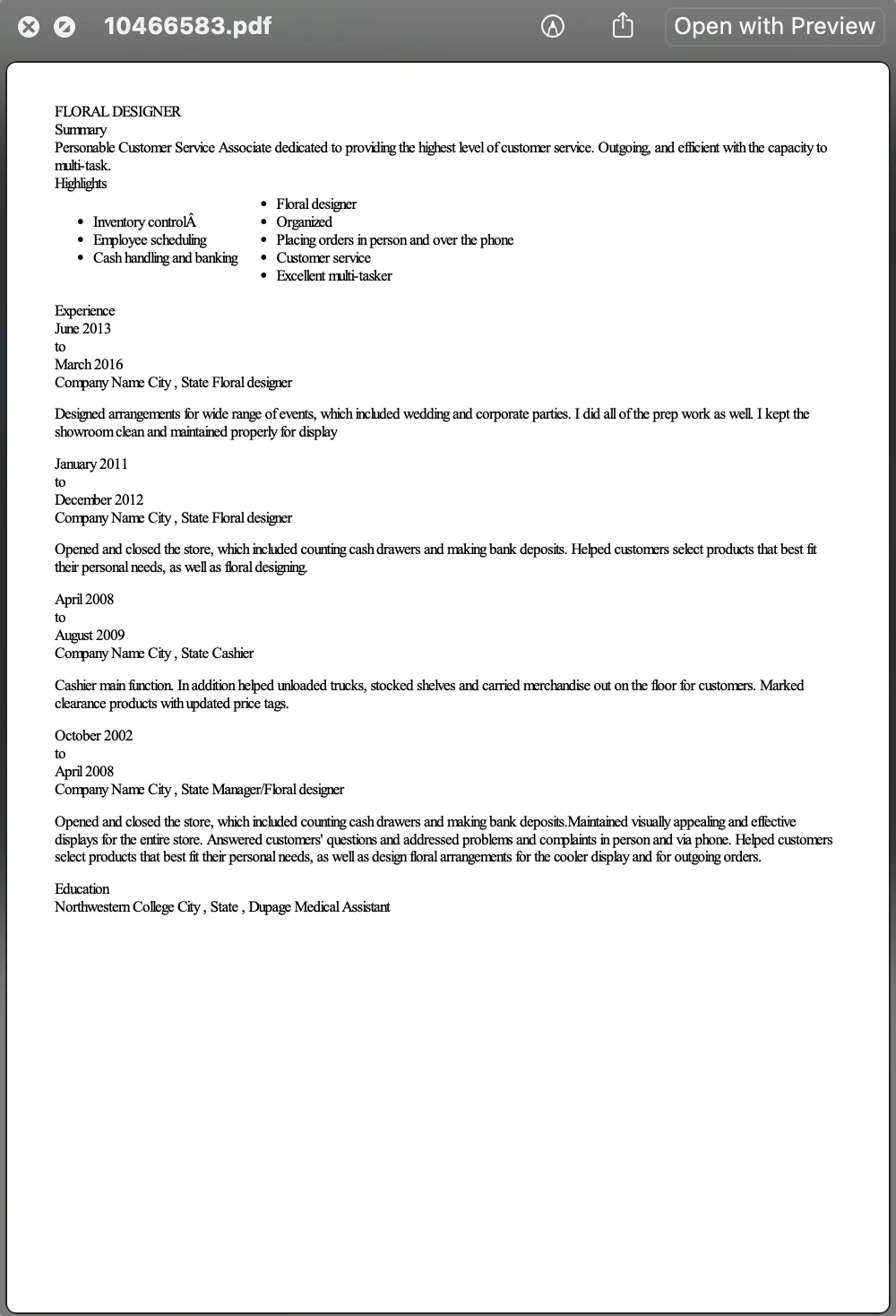
The result is rough. In the resume below, a floral designer's from the Kaggle dataset I tested the app on, the two columns of the Highlights list come out on one line, so "Inventory control" and "Organized" end up side by side as if they were one entry, with a stray  from the PDF stuck to the first. The words are all there, though, and the next step deals with the rest.
PDFs_folder_to_table <- function(folder_path) {
  convert_pdf_to_text <- function(pdf_path) {
    pdf_text_content <- pdf_text(pdf_path)

    extracted_text <- list()

    for (page in seq_along(pdf_text_content)) {
      text <- pdf_text_content[[page]]
      extracted_text[[page]] <- text
    }

    all_text <- paste(extracted_text, collapse = "\n")
  }

  get_file_name <- function(file_path) {
    file_path_sans_ext(basename(file_path))
  }

  pdf_files <- list.files(folder_path, pattern = ".pdf", full.names = TRUE)

  pdf_texts <- lapply(pdf_files, convert_pdf_to_text)

  table_data <- data.frame(
    PDF_Text = unlist(pdf_texts)
  )

  rownames(table_data) <- get_file_name(pdf_files)

  return(table_data)
}
04 Text cleaning
To a program, "Photoshop", "photoshop", and "photoshop," are three different things, so a search for the skill would miss two of them. Cleaning removes differences like these, the ones a person never notices.
Every resume is lowercased, its punctuation is removed, and its runs of spaces and line breaks collapse into one space. The resume above now starts "floral designer summary personable customer service associate". Numbers stay, because Cinema 4D needs its 4, and so does every other word, because the name of a tool has to survive whole.
clean_text <- function(text, as.corpus = T, lower = T, rm.number = T, rm.stopwords_english = T, rm.stopwords_bahasa = T, rm.punctuation = T, stem = T, rm.whitespace = T){
  text_corpus <- text %>% VectorSource() %>% VCorpus()

  if (lower){
    text_corpus <- tm_map(x = text_corpus,
                          FUN = content_transformer(tolower))
  }
  if (rm.number){
    text_corpus <- tm_map(x = text_corpus,
                          FUN = removeNumbers)
  }
  if (rm.stopwords_english){
    list_stop_words_english <- readLines("stop-words_english.txt", warn = FALSE, encoding = "UTF-8")

    text_corpus <- tm_map(x = text_corpus,
                          FUN = removeWords,
                          list_stop_words_english)
  }
  if (rm.stopwords_bahasa){
    list_stop_words_bahasa <- readLines("stop-words_bahasa.txt", warn = FALSE, encoding = "UTF-8")

    text_corpus <- tm_map(x = text_corpus,
                          FUN = removeWords,
                          list_stop_words_bahasa)
  }
  if (rm.punctuation){
    text_corpus <- tm_map(x = text_corpus,
                          FUN = removePunctuation)
  }
  if (stem){
    text_corpus <- tm_map(x = text_corpus,
                          FUN = stemDocument)
  }
  if (rm.whitespace){
    text_corpus <- tm_map(x = text_corpus,
                          FUN = stripWhitespace)
  }

  if (as.corpus){
    return(text_corpus)
  }
  else(
    return(sapply(text_corpus, as.character))
  )
}

resumes_df$PDF_Text <- clean_text(resumes_df$PDF_Text, as.corpus = F, rm.number = F, rm.stopwords_english = F, rm.stopwords_bahasa = F, stem = F)
05 N-grams
A clean resume is still one long string, while a skill can be one word like "Figma" or two like "Premiere Pro". To check whether a skill is in a resume, the app has to cut the resume into pieces the same size as the skill, and those pieces are called n-grams.
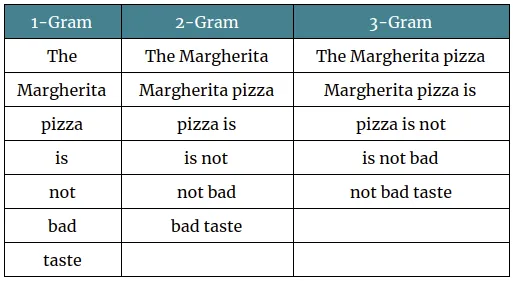
An n-gram is a run of n neighbouring words. The table below cuts one sentence into 1-grams, 2-grams, and 3-grams, also called unigrams, bigrams, and trigrams. The window moves one word at a time, so the seven words of the sentence give seven unigrams, six bigrams, and five trigrams.
N-grams keep the word order that single words lose. "Not bad" means something that "not" and "bad" do not mean apart, and "Premiere Pro" names a tool that "premiere" and "pro" do not name apart.
The app cuts each resume into every n-gram from a chosen length down to single words and puts them in one list, ready to compare against the skills.
tokenize_ngrams_by_range <- function(text, upper_range) {
  tokens <- c()
  for (i in upper_range:1) {
    tokens <- c(tokens, unlist(tokenize_ngrams(text, n = i)))
  }

  return(tokens)
}
06 Skill matching and ranking
With the resume in pieces, matching becomes a plain comparison. The skills are lowercased and split on commas, and a skill counts as matched when it equals one of the resume's n-grams. So "premiere pro" in the skills matches the bigram "premiere pro" in the resume, and nothing has to be guessed.
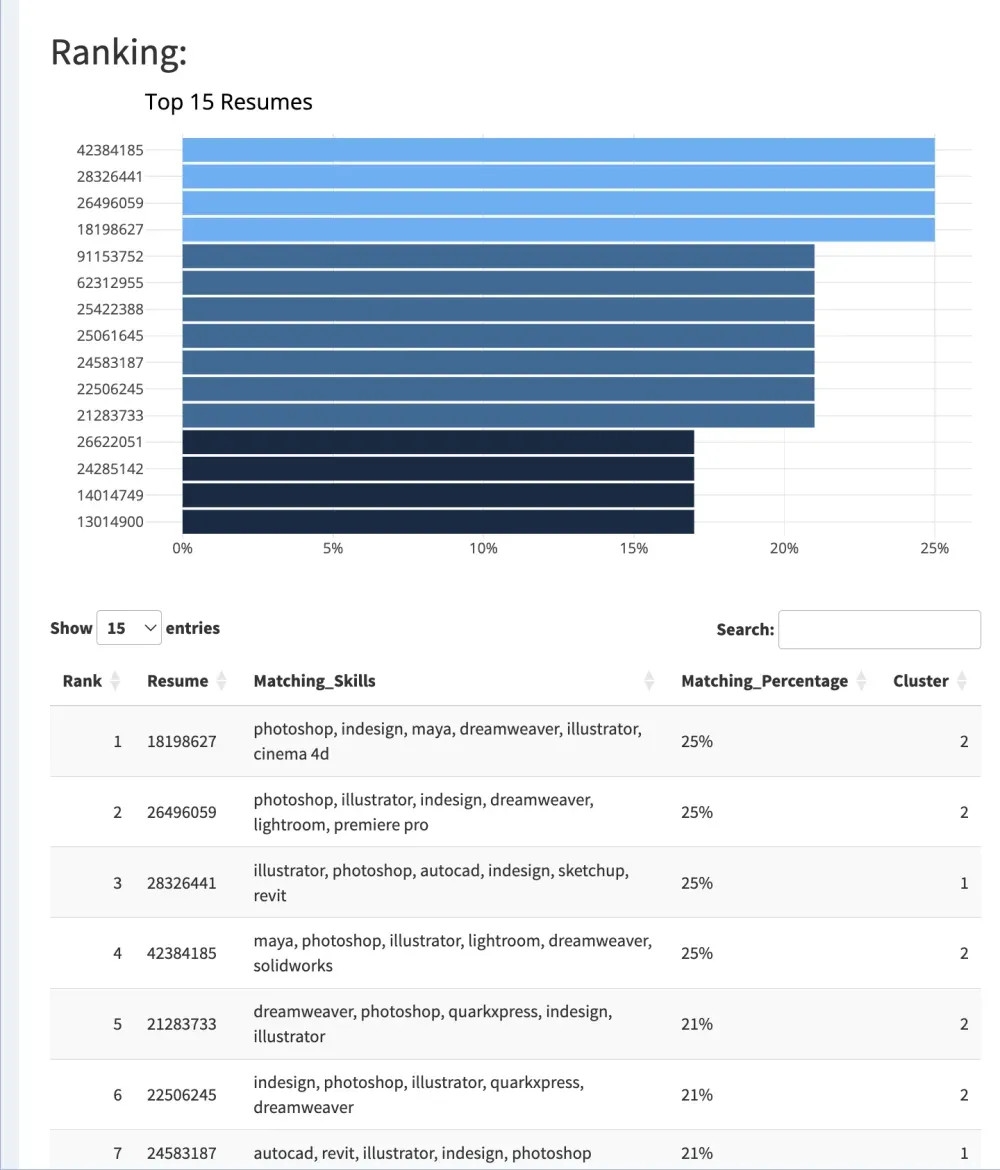
The score is the share of the skills a resume matched. The example list in the input form above has 24 skills, so a resume naming 6 of them scores 25%, the top score in this pile.
Resumes are sorted by that score. The top 15 go into a bar chart and all of them go into a table that shows the skills behind each score, so a recruiter can see why a resume sits where it does.
tokenized_desired_skills <- unlist(str_split(desired_skills %>% tolower() %>% trimws(), ", ")) %>% unique()
max_n_gram <- strsplit(desired_skills, ", ") %>% sapply(length) %>% max()

ranking_df <- resumes_df %>%
  rowwise() %>%
  mutate(Matching_Skills = intersect(tokenize_ngrams_by_range(PDF_Text, max_n_gram), tokenized_desired_skills) %>% paste(collapse = ", "),
         Matching_Percentage = ifelse(Matching_Skills == "", 0, round(length(unlist(str_split(Matching_Skills, ", "))) / length(tokenized_desired_skills), 2))) %>%
  as.data.frame() %>%
  arrange(desc(Matching_Percentage))
07 Descriptive skills
Not every recruiter thinks in names of tools. Many only have a job description, with lines like "Layer Management: Creating and managing layers". A sentence like that would never appear word for word in a resume, so the app has a Descriptive skills checkbox for a second way of matching.
This mode cleans the description and the resumes harder. Stopwords go first, the common words of English and Indonesian like "the" and "dan" that say nothing about a skill. Every word is then cut to its stem, its root form, so "editing" and "edits" both become "edit".
The description is then cut into unigrams and bigrams, the n-grams from before, and each one becomes a skill to look for. So "managing layers" becomes "manag", "layer", and "manag layer".
This casts a wider net at a cost. Generic words like "creating" and "managing" become skills of their own and match almost any resume, so this ranking separates resumes less sharply than one built from names of tools.
desired_skills <- desired_skills %>% clean_text(as.corpus = F, lower = T, rm.number = F,
                                                rm.stopwords_english = T, rm.stopwords_bahasa = T,
                                                rm.punctuation = T, stem = T, rm.whitespace = T)
tokenized_desired_skills <- desired_skills %>% tokenize_ngrams_by_range(2)
resumes_df$PDF_Text <- resumes_df$PDF_Text %>% clean_text(as.corpus = F, lower = T, rm.number = F,
                                                          rm.stopwords_english = T, rm.stopwords_bahasa = T,
                                                          rm.punctuation = T, stem = T, rm.whitespace = T)
max_n_gram <- 2
08 Resume viewer
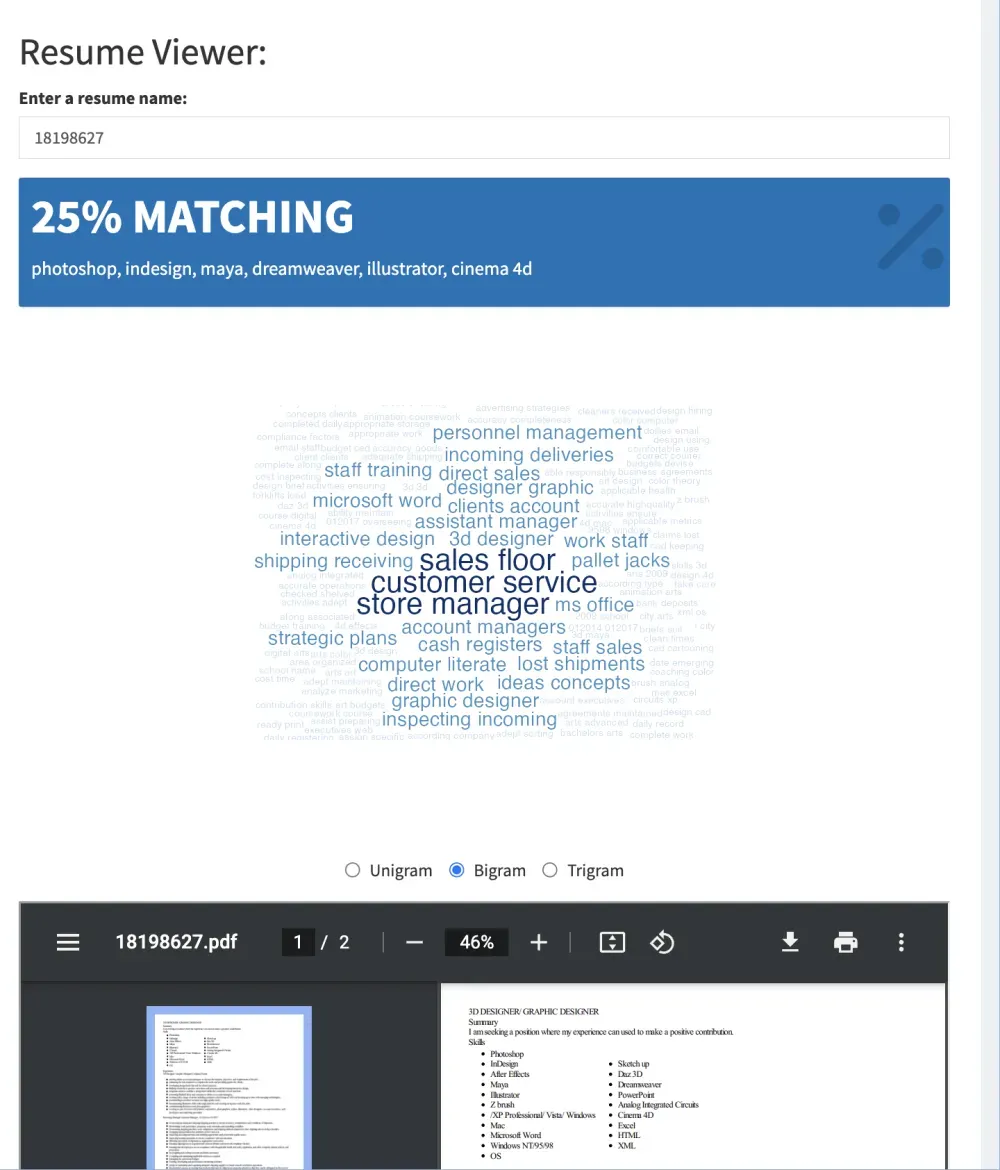
A ranking says which resume to open first, and the recruiter still has to read it. The viewer makes that quicker. Any one resume opens with its score, the skills it matched, a word cloud of what it talks about, and the PDF itself.
A word cloud draws each word larger the more often it appears, so a resume can be read at a glance. Stopwords are removed first, so the big words are the ones that say something.
N-grams come back here, as a choice between unigrams, bigrams, and trigrams under the cloud. Single words say little on their own, like "store" or "customer". As bigrams, the resume below reads "customer service", "store manager", and "sales floor", which tells the recruiter that this resume, near the top of a design ranking, also talks a lot about retail.
get_wordcloud <- function(tokens, scale = c(2, 0), normalize_higher_ngrams = F) {

  words <- data.frame(token = tokens) %>%
    count(token, sort = TRUE) %>%
    na.omit()

  if (normalize_higher_ngrams){
    words <- words %>% rowwise() %>% mutate(n = n * length(unlist(str_split(token, " "))) + 1)
  }

  words %>%
    with(
      wordcloud(
        words = token,
        random.order = FALSE,
        color = colorRampPalette(c("#B8E2FF", "#00416F"))(length(unique(words$token))),
        min.freq = 1,
        scale = scale,
        rot.per = 0,
        freq = n
      )
    )
}
09 K-means clustering
A ranking puts every resume on one line, and that hides how two resumes can reach the same score in different ways. In the table above, one resume at 25% names AutoCAD, Revit, and SketchUp, and another at 25% names Photoshop, Dreamweaver, and Maya. One person draws buildings and the other makes graphics, and an opening usually wants one of them.
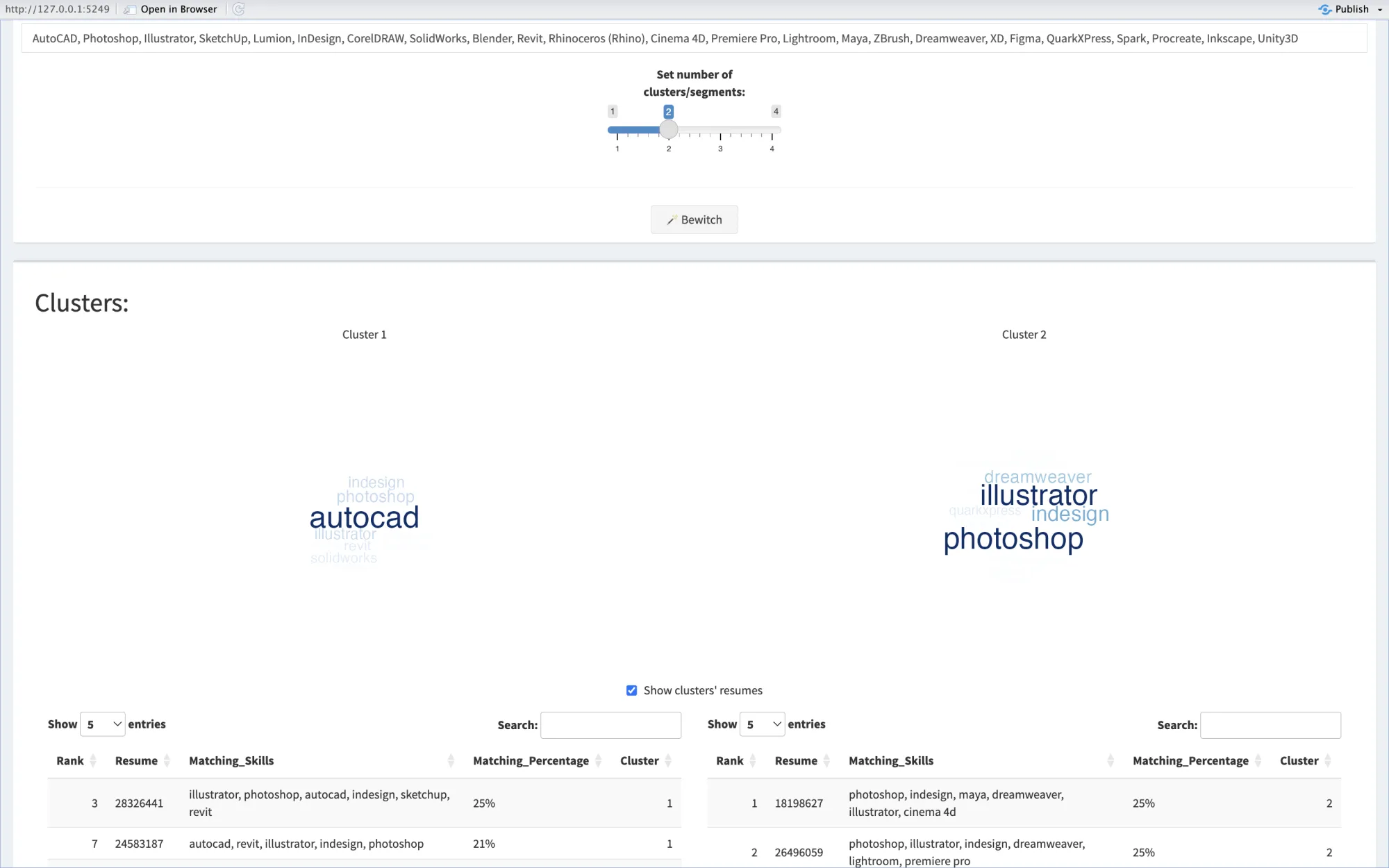
So after the ranking, a slider splits the resumes into up to four groups by the skills they matched, using k-means. K-means sorts items into a chosen number of groups, k, without being told what the groups are. Each resume becomes a row of numbers, one column per word in the matched skills, counting how often the resume's matches use that word. K-means places k centres among those rows, gives each resume to its nearest centre, and keeps moving resumes and centres until nothing changes.
Nobody tells it what a CAD group is. In the screenshot, with k at 2, one cluster gathers around AutoCAD and the other around Photoshop and Illustrator, each shown as a word cloud of its matched skills above a table of its resumes.
cluster_resumes <- function(ranking_df, k){
  dtm <- DocumentTermMatrix((ranking_df %>% mutate(Matching_Skills = removePunctuation(Matching_Skills)))$Matching_Skills)

  df <- dtm %>%
    as.matrix() %>%
    as.data.frame()

  rownames(df) <- rownames(ranking_df)

  clusters <- kmeans(x = df,
                     centers = k)

  clustered_ranking_df <- ranking_df %>% mutate(Cluster = clusters$cluster)

  return(clustered_ranking_df)
}
10 System design
Every step above ran inside one Shiny program in R, deployed on shinyapps.io, a hosting service for Shiny apps. The recruiter's browser sent the PDFs and the skills. The server kept the PDFs where the viewer could show them, read their text with pdftools, cleaned it with tm, cut it into n-grams with tokenizers, and ran k-means, and the page drew the results with plotly, DT, and wordcloud.
The uploaded files were cleared on every new upload and when the session ended, and nothing was kept in a database.
11 Limits
Matching exact words keeps every score explainable, and it is also the biggest limit. A skill counts only when its exact words appear, so a designer who writes "photo editing" never matches "Photoshop". The app also reads only the text layer, so a scanned PDF with no text scores zero.
The cleaning has gaps. Punctuation disappears instead of becoming a space, so "Photoshop/Illustrator" becomes one word that matches neither. The skills are only lowercased, so one typed as "Node.js" keeps its dot and never matches a resume whose dot was removed.
The n-grams run longer than they need to. Their limit is the number of skills rather than the words in the longest skill, so a list of 24 skills cuts every resume into runs of up to 24 words for the same matches. Scores are also rounded to two decimals before sorting, so in a long description different scores can tie.
The clusters work on single words, not whole skills, so "Premiere Pro" counts as two and XD, shorter than three letters, never counts. K-means starts from random centres with no fixed seed, so pressing Bewitch twice on the same resumes can give different clusters.
The score is a share of the whole list, so a long wish list keeps every score low, which is why the best resumes above reach only 25%.
Resume Wizard
A recruiter gets every resume ranked by skill in one press, then grouped by the skills they share, with the skills behind each rank in plain sight